When we introduced Vigil, it was a behavioral system monitor — watch your processes, learn what normal looks like, flag what isn’t. That’s still the foundation. But over the last several builds, a question kept pulling the roadmap in one direction: what is the biggest new thing running on your Mac that you can’t see?
The answer, for a growing number of people, is AI agents. Coding assistants with shell access. MCP servers with tool definitions you’ve never read. Scheduled tasks that run an agent at 3 AM with pre-approved permissions and no human watching. Build 14 is Vigil leaning hard into that answer.
MCP visibility, overhauled
The Model Context Protocol is how AI tools get capabilities — file access, database queries, browser control, API calls. It’s also a genuinely new attack surface, and most of it is invisible: server configs scattered across a dozen tools’ dotfiles, tool definitions fetched at runtime, permissions granted once and forgotten.
Vigil’s MCP view was rebuilt from the ground up. Servers are now grouped by the tool that configured them, with usage statistics pulled from actual session logs — not just “this server is configured” but “this server’s tools were called 40 times this week.” Risk badges, stat cards for active servers and call counts, and a dismiss/resolve workflow on risk signals so the list stays actionable.
Six new threat detections
Underneath the view, the risk engine gained six new detection categories mapped to the MCP threat model:
- Tool shadowing — the same MCP server name configured across different tools, where one instance can impersonate another
- Dangerous tool combinations — read + send, query + publish available across different servers in the same session; the classic “lethal trifecta” setup for data exfiltration
- Cross-server data flow — sessions where data actually moves from a sensitive server to an external one
- Config drift — MCP servers and permissions that changed between scans, so a quietly added server doesn’t stay quiet
- Supply chain — signals about where server code comes from
- Tool description injection — scanning tool descriptions on disk for prompt-injection patterns, because a tool’s description is text your agent reads and trusts
That last one is enabled by a fleshed-out Claude Desktop adapter, which now reads remote MCP server configurations with full tool schemas — names, descriptions, input schemas — so injection scanning runs against the real metadata your agent sees.
Risk detection across seven adapters
AI security monitoring is only as good as its coverage. Build 14 extends risk detection across seven tool adapters:
- Ollama graduated from a stub to a real adapter — it reads model manifests, reports model counts and sizes, and flags an API bound to a non-localhost address (an
OLLAMA_HOSTset to0.0.0.0means anything on your network can use your models) - Codex — suspicious shell commands, sensitive file access, desktop mode, trusted-project grants
- Zed — external agents running third-party code, extension counts, MCP risks
- Cursor, Cline, and Roo — MCP risk analysis, plus auto-approve and
alwaysAllowdetection on the latter two, because an agent that never has to ask is an agent you’ve stopped supervising - Claude Code — the deepest adapter, now feeding session-level analysis into all of the above
Unattended agents
Everything above assumes a human is at the keyboard. Increasingly, one isn’t. A new unattended-agent scanner discovers agents configured to act with nobody present:
- Scheduled agent tasks — cron expressions, folder grants, browser domain allowlists, permission modes, and last-run times, with skill files scanned for capability notes like shell access, package installation, and self-modification of schedules
- AI cron jobs — crontab entries that invoke AI CLIs directly or through scripts, flagging headless invocations that run on pre-approved permissions with no prompt and no oversight
An agent that can modify its own schedule, install packages, or drive a browser while you sleep isn’t hypothetical anymore — people are setting these up on purpose. Vigil doesn’t judge that; it makes sure you know it’s happening, when it last ran, and what it’s allowed to touch.
Glance mode
Vigil’s Advanced sidebar has fourteen views. That’s right for a security-minded power user and wrong for everyone else. The new Glance mode is a different way in: a physics-based orb field where each AI tool is a glowing orb — riskier tools orbit closer to the center — with MCP servers as tethered satellites. A status banner says what’s going on in one plain-English sentence, and action cards surface the top three risk signals with what happened, why it matters, and what to do.
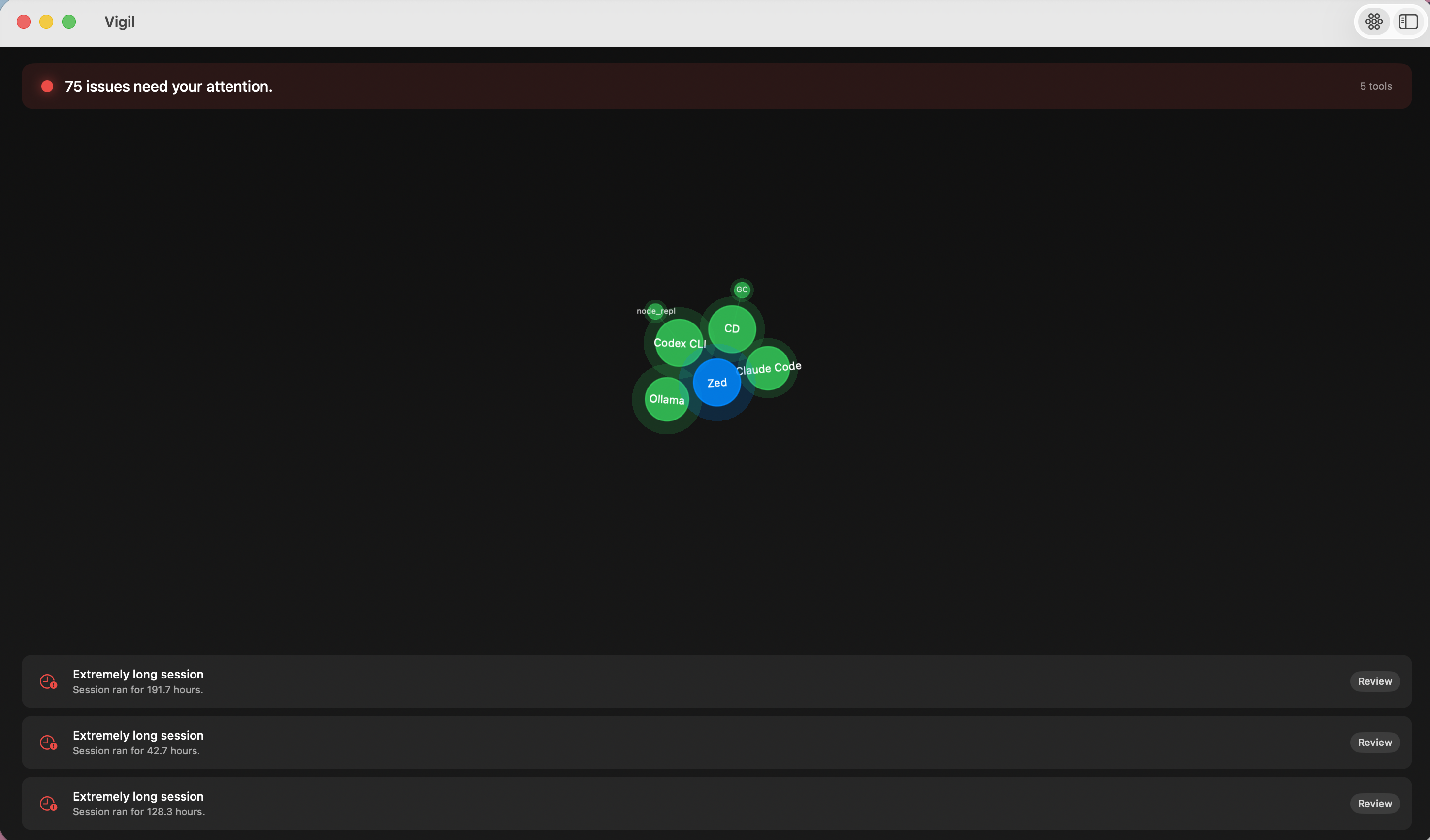
Even the initial scan is part of the experience. Instead of a spinner, radar rings sweep outward while orbs materialize the moment each tool’s scan completes, and the banner narrates the actual work: “Checking Codex CLI… 7 of 19,” “Found Claude Code · 214 sessions.” The loading state is the product doing its job, visibly.
New users start in Glance; a toolbar toggle switches to Advanced and remembers your choice.
The Capability Ledger
The release’s capstone is a new Capability Ledger view, built on a simple premise: you should be able to see, in one place, every principal on your Mac that can act on your behalf. Three layers:
The ledger lists every actor — AI tools, MCP servers, scheduled tasks, cron jobs — with its file scope, shell and network access, browser domains, schedule, and approval mode. Per-tool MCP grants are connected back to the servers they authorize, and the Codex adapter now parses real sandbox policy: writable roots, network access, approval policy per thread.
The coverage matrix shows what Vigil can check for each tool across six dimensions — config, sessions, risks, MCP, permissions, schedules — independent of what’s installed on your machine. A test asserts the matrix exactly matches the adapter registry, so the claims can’t silently drift from the code.
The visibility map is the part we care most about: an honest accounting of what Vigil cannot see. Sensitive data pasted into ChatGPT in a browser. The content of network egress. Clipboard flows. Enforcement — Vigil observes, it doesn’t block. Each blind spot names the companion tool that covers it: Prism for browser and HTTP traffic, Tapped for the network, Harden for enforcement. Full visibility is a combination of tools, and we’d rather show you the map than pretend one app is the whole territory.
Under the hood
A performance pass moved registry scans onto background threads with shared caching — and introduced two bugs we then found and fixed properly: a startup deadlock from a non-reentrant lock re-entered through the adapter cache, and an O(n²) session-attribution loop that turned large session histories into a parse bomb. Both root causes are documented in the commit history, because “we broke it, found it, and fixed it” is a more useful engineering record than silence.
The release ships with 182 tests passing, and the build pipeline now guards against shipping from a dirty tree.
Where this is going
Vigil started by asking whether your processes are behaving normally. This release asks the same question about your agents — what they can do, what they’re configured to touch, and what runs when you’re not looking. The observe-first philosophy hasn’t changed: Vigil doesn’t block, it surfaces. But the thing worth observing on a Mac in 2026 increasingly isn’t just CPU and disk I/O — it’s capability. Who can act, with what permissions, on whose approval.
The Capability Ledger is the first draft of that answer. There’s more coming.